


EasyClean - File Cleaner
3.8220.00 Reviews
App Specs
- Version
- 1.0.38
- Updated On
- License
- Free
- Downloads
- 1,000,000+
- Developer
- Delta Tools Dev
- Categories
- Productivity
- Platform
- Android
Screenshots

 Analysis by AppCompare
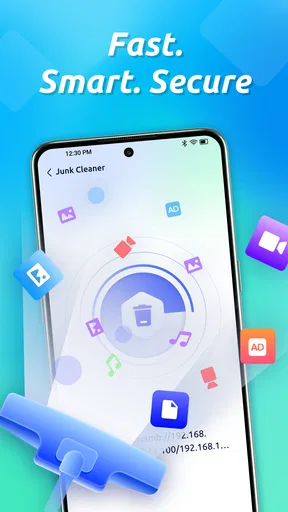
When my phone begins to feel crowded or a network connection seems worth checking, I want a tool that makes routine maintenance easy to approach without turning it into a project. EasyClean - File Cleaner is a free productivity app from Delta Tools Dev, and its focus spans storage cleanup, network scanning, and privacy protection. That combination could suit someone who prefers one place to start, though I’d treat any suggested cleanup as a decision to review rather than a reason to delete files automatically.
What to expect from a quick check
The appeal of a cleaner is often the promise of an instant speed boost, but I wouldn’t judge a phone’s performance by how satisfying a cleanup animation looks. Removing clutter may help when storage is genuinely tight; it cannot make every slow app, weak connection, or aging device behave like new. I’d use EasyClean to investigate a specific concern—such as running low on space—then check whether that action actually improves the situation.
That distinction matters because phones already handle many temporary files on their own, and some cached data is useful: it can help apps reopen content without fetching or rebuilding everything. Clearing it may free room temporarily, but apps can recreate it, and the same content might load more slowly the next time. My practical rule is to prioritize files I recognize and no longer need, rather than treating every item labelled as clutter as disposable.
For a first pass, I’d look at what the app identifies, pause before confirming removals, and ask whether each category contains anything I expect to keep. If I’m trying to fix one stubborn app, clearing that app’s cache through Android settings may be more targeted than a broad cleanup. EasyClean is more useful as a convenient overview than as proof that every phone needs frequent sweeping.
Busy days and careful cleanup
A realistic use case is a day of travel: I take photos, download a few documents, and discover that storage is nearly full just before I need to save something important. A cleaning tool can help me inspect the situation and decide what is safe to remove. I’d still back up photos I care about and review personal files before deleting anything; convenience is not a substitute for knowing where a file is stored or whether it can be recovered.
For heavier use, I’d avoid running a broad scan while I’m in the middle of a call, navigation, or a time-sensitive task. The app’s summary gives me a reason to inspect storage, but I would choose a quiet moment to review proposed actions and let the phone finish. That is less about assuming the scan is demanding and more about keeping maintenance separate from work I cannot interrupt.
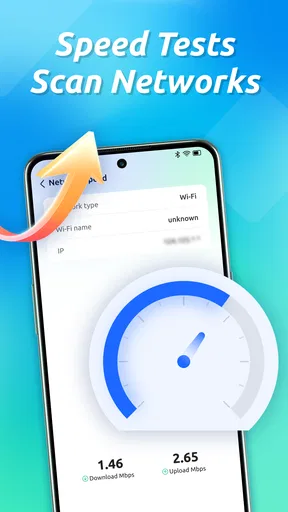
The network-scanning and privacy-protection focus also gives the app a role beyond tidying storage. I’d treat a scan as a prompt to check a connection or review my privacy habits, not as a guarantee that a network is safe or that every privacy risk has been eliminated. When connecting somewhere unfamiliar, sensible habits—avoiding sensitive activity on a connection I don’t trust and checking the network details available on the phone—still matter.
Worth Reading Before You Choose

EA SPORTS FC Mobile 26 Is a Bigger Football Game, but It Takes Time

Flipboard Shows What News Apps Must Do Beyond the Feed

Switching to Android Auto Means Rethinking Your Driving Routine

Google Calendar Makes a Crowded Week Easier to Manage

Ludo King Makes the Most of the Minutes Between Plans

Baby Panda World Brings Quick Play to Modern Phones, but Its Game Library Feels Busy
A closer look at EasyClean
Have you ever felt like your phone is starting to act a little sluggish? Maybe you've noticed that apps take longer to open, or your storage is hitting its limit way too soon. Well, I’ve been there too, and that’s when I stumbled upon EasyClean - File Cleaner. Let me tell you, this app might just be the secret sauce to keeping your device running smooth as butter.
Getting Started with EasyClean
First off, downloading and setting up EasyClean is a breeze. Just head over to your app store, hit download, and you’re good to go. Once you open it, you'll be welcomed by a clean and intuitive interface. None of that overwhelming tech jargon—just straightforward options that even a tech newbie can navigate without breaking a sweat.
Upon launching, the app gives you a quick overview of your device’s storage situation. It's like having a personal assistant who’s always keeping an eye on your phone's well-being. From there, you can dive into various cleaning options designed to optimize your device.
Features Worth Mentioning
Alright, let’s dive into what makes this cleaner a useful tool:
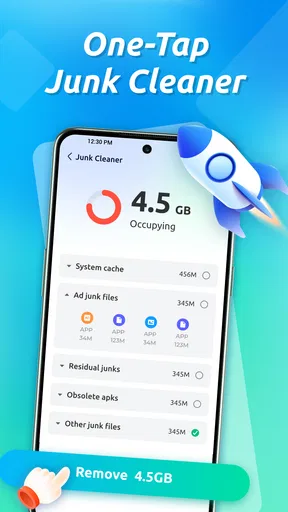
- Junk File Cleaning: This feature is a game-changer. It hunts down all those pesky temporary files and caches that you didn’t even know were cluttering up your phone. One tap, and poof—they're gone.
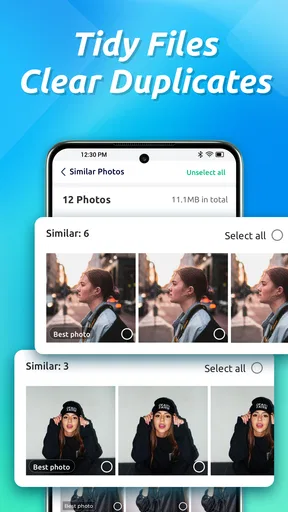
- Photo Management: Ever notice how your gallery seems to fill up with duplicates? EasyClean helps you sort through them, suggesting which ones you might want to delete. It's like Marie Kondo for your photos.
- App Management: The app also points out which installed apps are hogging your storage. It even shows when you last used them, so you can decide if it's time to say goodbye.
- Battery Saver: This nifty tool helps extend your battery life by identifying power-hungry apps and suggesting optimizations.
Making the suggestions work for you
Those organizing tools are most valuable when they support a decision, not make it on your behalf. For photos, I’d check a suggested duplicate against the original before removing it; similar-looking pictures may capture different moments, and a deleted image can be difficult to replace. If the app points out an app I rarely use, I’d consider whether it holds offline files, sign-in details, or a feature I need only occasionally before uninstalling it.
This is also where a little routine can beat a dramatic cleanup. I’d make time to review the largest storage categories when space starts to feel tight, then handle photos, unused apps, and temporary files as separate decisions. That approach helps avoid the common mistake of accepting every suggestion in one go and later discovering that a useful download or familiar app has disappeared.
The battery-related suggestions deserve similar restraint. Identifying an app that uses power can be a helpful starting point, but a battery drain can also come from how often a service is used or from conditions outside a cleaner’s control. I’d compare the phone’s own battery settings with EasyClean’s suggestions before changing habits or limiting an app I rely on. If battery life is the only problem, the built-in battery tools are the more direct place to begin.
Where it fits among everyday alternatives
Compared with Android’s built-in storage controls, a cleaner can feel more approachable because it gathers different maintenance ideas in one place. The trade-off is that built-in settings are often the better choice when I want to inspect a particular app, remove a known download, or check battery use without adding another layer of suggestions. EasyClean makes sense when I want a guided overview; it is less compelling if I already manage files comfortably with the phone’s own tools.
It also differs from a dedicated file manager. A file manager is usually the better fit when I know exactly which folder or document I need to organize, while a cleaner is aimed at finding possible areas to review. Neither replaces a backup. If a file matters, keeping a separate copy before deleting it is a safer workflow than relying on any cleanup recommendation to be reversible.
Likewise, a network scanner can help bring attention to a connection, but it should not replace careful network choices or a specialist tool when I need detailed technical diagnostics. I’d choose EasyClean for an accessible maintenance check, not for deep troubleshooting or a security guarantee. That boundary keeps the app’s broad scope useful without asking it to do more than a general-purpose phone tool should.
Using EasyClean for a Smoother Experience
One of the things I love about EasyClean is how it makes maintenance almost effortless. You can schedule regular clean-ups, so your device stays fresh without you having to lift a finger. It’s like setting up autopilot for your phone’s health.
Plus, the app is super lightweight, meaning it won’t add to your storage woes. It runs quietly in the background, only pinging you when there’s something that needs your attention. This makes it a perfect companion for those of us who prefer to set it and forget it.
Reliability, privacy, and control
For me, reliability in a maintenance app is not just whether it opens; it is whether its suggestions are understandable and whether I stay in control of changes. I’d use EasyClean as an occasional helper and check the phone afterward, especially after removing files or changing an app’s behavior. If a cleanup does not free useful space or resolve the problem I had, repeating it more often is unlikely to be a meaningful fix.
Because network checks and privacy protection are part of its purpose, it is reasonable to ask whether installing it requires sharing information or granting access. I would read the permission prompts on my device and only allow access that makes sense for the task I’m choosing. The same cautious approach applies to any cleaner: a broad promise to protect privacy is not a reason to skip reviewing permissions or to enter sensitive information into an unfamiliar service.
For recovery, I would not assume that a deleted item can be restored from within a cleaner. Before removing anything personal, I’d confirm that a backup exists or that the item is replaceable. That is particularly important for photos, downloads, and files that are not synced elsewhere. A useful cleaner should make it easier to decide what to keep, but the safest recovery plan starts before deletion.
Who will get the most from it
I can see EasyClean suiting someone who wants a guided starting point for storage housekeeping, appreciates seeing suggestions together, and is comfortable checking each one. It may also help a less technical user who finds separate settings screens confusing, provided they take a moment to understand what a proposed action will remove. The app is free, rated for Everyone, and has an average rating of 3.9 from around two thousand ratings, with over a million installs; those figures suggest an established audience, but they do not tell me whether its approach will suit every device or workflow.
I’d skip it if I already know how to manage storage with Android’s built-in controls, want a full-featured file organizer, or expect a cleaner to fix poor performance by itself. It is also not the right choice for someone who would rather never review recommendations before acting. A broad convenience tool works best when its owner remains involved, especially around personal files and privacy-sensitive decisions.
There are device limits to keep in mind, too. EasyClean’s current version is 1.0.30, it was released on June 20, 2025, and it requires Android 7.0 or later. That makes compatibility a practical first check before installing, particularly on an older phone. On any supported device, I’d leave enough time to inspect results rather than expecting a scan to transform a phone instantly; the value is in making a more informed maintenance choice, not in a guaranteed performance jump.
Why You Might Consider Giving it a Try
If you’re someone who’s always on the go, juggling between apps for work and play, then keeping your phone in top shape is crucial. With EasyClean, you’re not just cleaning up space; you’re enhancing your device’s overall performance. And who doesn’t want a phone that feels brand new every day?
In my experience, it’s rare to find an app that does what it promises without any hidden catches. EasyClean feels like a breath of fresh air, offering a mix of practicality and user-friendliness that’s hard to beat.
So, if your phone is feeling more like a sluggish old friend rather than a zippy companion, maybe it’s time to give EasyClean a whirl. It just might become your new go-to tool for keeping things tidy and efficient. Happy cleaning!
My performance verdict
I’d describe EasyClean as a convenient maintenance companion, not a performance cure. Its clean, accessible approach can help turn a vague “my phone feels full” concern into a set of things to review, and the wider focus on networks and privacy makes it more than a single-purpose storage shortcut. The trade-off is that broad recommendations call for judgment: built-in Android controls, a file manager, or a backup tool may be better for precise tasks or safer handling of important files.
My recommendation is to try it if you want guided housekeeping and are willing to review suggestions carefully. Use it when you have a specific reason to check storage or connections, keep valuable files backed up, and judge the result by whether it solves that real problem. If you expect automatic recovery, deep network diagnostics, or a dramatic speed boost, another tool—or simply the phone’s own settings—will be a better fit.
Pros
- User-friendly interface for easy navigation.
- Quick scanning process saves time.
- Supports multiple file types for cleaning.
- Customizable cleaning options available.
- Lightweight app with minimal resource usage.
Cons
- Limited features in the free version.
- Occasional ads can interrupt workflow.
- Requires permissions to access files.
- No cloud storage integration.
- Lacks advanced cleaning tools.
FAQs for EasyClean - File Cleaner
What is EasyClean - File Cleaner, and how does it work?
EasyClean - File Cleaner is an app designed to optimize your device by removing unnecessary files, cache, and residual data. It scans your device to identify junk that can be safely deleted. This helps free up storage space and potentially improve device performance by reducing clutter and organizing files efficiently.
Is EasyClean - File Cleaner safe to use on my device?
Yes, EasyClean - File Cleaner is designed with user safety in mind. It offers secure cleaning options that ensure only unnecessary files are removed. The app does not delete important system files or personal data, and it typically includes a preview function to let you review files before deletion.
Can EasyClean - File Cleaner improve my device's performance?
By removing junk files and clearing cached data, EasyClean - File Cleaner can help improve your device's performance. It reduces load times by freeing up RAM and storage space, potentially making your device run smoother and faster. However, individual results may vary based on device usage and configuration.
Does EasyClean - File Cleaner require any special permissions?
EasyClean - File Cleaner requires certain permissions to function effectively. These may include access to storage for scanning and deleting files, and possibly network access for updates or additional features. It’s important to review the permissions requested during installation to ensure you’re comfortable with the access granted.
Are there any costs associated with using EasyClean - File Cleaner?
EasyClean - File Cleaner may offer both free and premium versions. The free version typically includes basic cleaning features, while the premium version might offer advanced functions such as deep cleaning, no ads, or scheduled clean-ups. Always check the app store for the latest pricing and subscription details.


